YouTube Thumbnail vs Video Cover: What's the Difference?
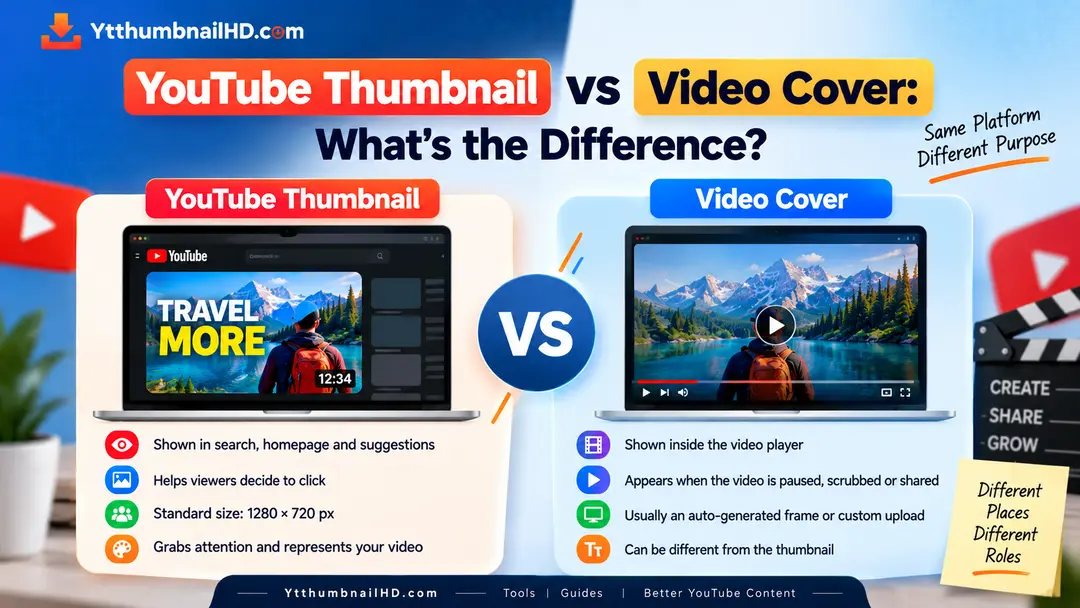
The terms YouTube thumbnail and video cover are sometimes used interchangeably, but they can mean slightly different things depending on the platform, context, or person using the term.
On YouTube, the thumbnail is the preview image associated with a video. It is designed to help viewers understand what a video is about before they watch it.
The phrase "video cover" is more general. It can refer to a cover or preview image used to represent a video on a website, social platform, video player, or content management system.
A YouTube thumbnail is YouTube's specific term for the image used to represent a video in places such as search results, recommendations, and channel pages. "Video cover" is a broader term that can describe a preview image used by different video platforms or websites.
1. What Is a YouTube Thumbnail?
A YouTube thumbnail is the image that represents a video before a viewer starts watching it.
It can appear alongside the video's title and other information in different parts of YouTube. Creators can upload a custom thumbnail for eligible content, while YouTube can also provide automatically generated thumbnail options.
The thumbnail is therefore closely connected to the video's presentation. It gives potential viewers a visual indication of what they can expect from the content.
2. What Is a Video Cover?
"Video cover" is not as specific a YouTube term as "thumbnail." It is a broader description for an image that visually represents video content.
A website might call the image displayed before a video starts a cover image. Another platform may use terms such as cover, preview image, poster image, or thumbnail.
In other words, the meaning of "video cover" depends on the platform and the context in which the term is being used.
"Thumbnail" is a specific and widely used term for a video's preview image, while "video cover" is a more general description.
3. Main Difference Between Them
The biggest difference is usually the terminology and context rather than the basic purpose of the image.
YouTube Thumbnail
A specific image associated with a YouTube video and used to represent that video across YouTube.
Video Cover
A broader term for an image used to represent or preview video content on a website, application, or another platform.
This means that a YouTube thumbnail can also be described informally as a video cover, but not every video cover is necessarily a YouTube thumbnail.
4. Where Does a YouTube Thumbnail Appear?
YouTube uses thumbnails in several parts of its experience where videos are presented to viewers.
Search Results
A thumbnail can appear beside a video when users search for content on YouTube.
Recommended Videos
Thumbnails help visually represent videos shown in recommendation areas.
Home Feed
Video thumbnails are part of the visual presentation users see while browsing YouTube.
Channel Pages
Thumbnails help represent individual videos when viewers browse a creator's channel.
5. Where Are Video Covers Used?
A video cover can be used in many different environments. The exact function depends on the platform or website.
For example, a website may display a cover image before an embedded video is played. A content platform may use an image to represent a video in a list or content library.
Some video players also use a poster image that remains visible before playback begins. This serves a similar visual purpose but may have different technical terminology.
6. YouTube Thumbnail vs Video Cover
The following comparison makes the distinction easier to understand.
Purpose
Both can represent video content before playback or while users are browsing.
Terminology
YouTube specifically uses the term thumbnail, while "video cover" is a broader expression.
Platform
A YouTube thumbnail is associated with YouTube, while a video cover can exist on many platforms.
Specifications
Image dimensions and technical requirements can vary depending on the platform using the image.
7. Why the YouTube Thumbnail Matters
A thumbnail is an important part of how a YouTube video is presented to potential viewers.
YouTube describes thumbnails and titles as important pieces of information viewers see when browsing videos. This makes the thumbnail part of the overall packaging of a video.
A useful thumbnail should make the subject of the video clear, remain readable at different sizes, and accurately represent the content.
If you want to learn more about what makes a YouTube thumbnail effective, our YouTube thumbnail design tips for beginners cover the basic design principles in more detail.
8. Can the Same Image Be Used?
Technically, the same image may sometimes be suitable for multiple places, but that does not mean it is always the best choice.
Different platforms can display images at different dimensions and in different layouts. An image that looks good in one environment may be cropped or become harder to understand in another.
Before reusing a thumbnail as a video cover elsewhere, check the target platform's image dimensions, crop, placement, and display size.
9. What About YouTube Shorts?
YouTube Shorts use a vertical presentation, so their thumbnail context is different from the standard landscape video format.
YouTube's current guidance recommends a 9:16 aspect ratio for Shorts thumbnail images, with 2160 × 3840 pixels as the recommended resolution.
If you are working specifically with Shorts thumbnails, see our YouTube Shorts thumbnail guide for more information.
10. Do They Have the Same Dimensions?
Not necessarily.
A YouTube thumbnail follows YouTube's thumbnail specifications. A video cover used on another website or platform may have completely different requirements.
For regular YouTube videos, YouTube currently recommends a 16:9 custom thumbnail at 3840 × 2160 pixels, with a minimum width of 640 pixels.
You can read the full specifications in our YouTube thumbnail size and dimensions guide .
Always check the requirements of the platform where the image will actually be used. Do not assume that one image specification applies everywhere.
11. Why Are These Terms Confused?
The confusion is understandable because all of these terms describe images that can visually represent a video.
People may use "thumbnail," "cover image," "preview image," and "video cover" to describe similar concepts, even when the platform itself uses only one of those terms.
Thumbnail
A commonly used term for a small preview or representative image.
Video Cover
A broader phrase describing an image used to represent video content.
Poster Image
A term commonly used in video-player or web development contexts for the image shown before playback.
The exact meaning should therefore be determined from the platform or application being discussed.
Which Term Should You Use?
If you are talking specifically about YouTube, "YouTube thumbnail" is the clearest and most precise term.
If you are discussing video imagery across different platforms or building a website with a video player, terms such as "video cover," "preview image," or "poster image" may be used depending on the implementation.
Using the platform's own terminology is usually the easiest way to avoid confusion.
Can You Download a YouTube Thumbnail?
Yes. If you need the image associated with a publicly available YouTube video, you can use a dedicated thumbnail downloader instead of downloading the entire video.
You can read our guide Can You Download a YouTube Thumbnail From Any Video? to learn more about how thumbnail retrieval works.
Need a YouTube Thumbnail?
If you want to download the thumbnail associated with a YouTube video, enter the video URL into YTThumbnailHD and retrieve the available thumbnail image.
Download YouTube ThumbnailFrequently Asked Questions
They can describe a similar type of image, but "YouTube thumbnail" is the more specific term for the image used to represent a YouTube video. "Video cover" is a broader term that can be used on different platforms.
People may informally call it a video cover, preview image, or cover image. However, YouTube itself commonly uses the term thumbnail.
Not necessarily. A video cover can follow the requirements of whatever website, application, or platform is using it. YouTube's regular video thumbnail format is different from requirements used by other platforms.
YouTube currently recommends a 16:9 custom thumbnail at 3840 × 2160 pixels, with a minimum width of 640 pixels for regular videos.
You may be able to use the same image, but check the website or video player's required dimensions, aspect ratio, cropping, and usage rights before doing so.