YouTube Thumbnail Size: Complete Size and Dimensions Guide for 2026
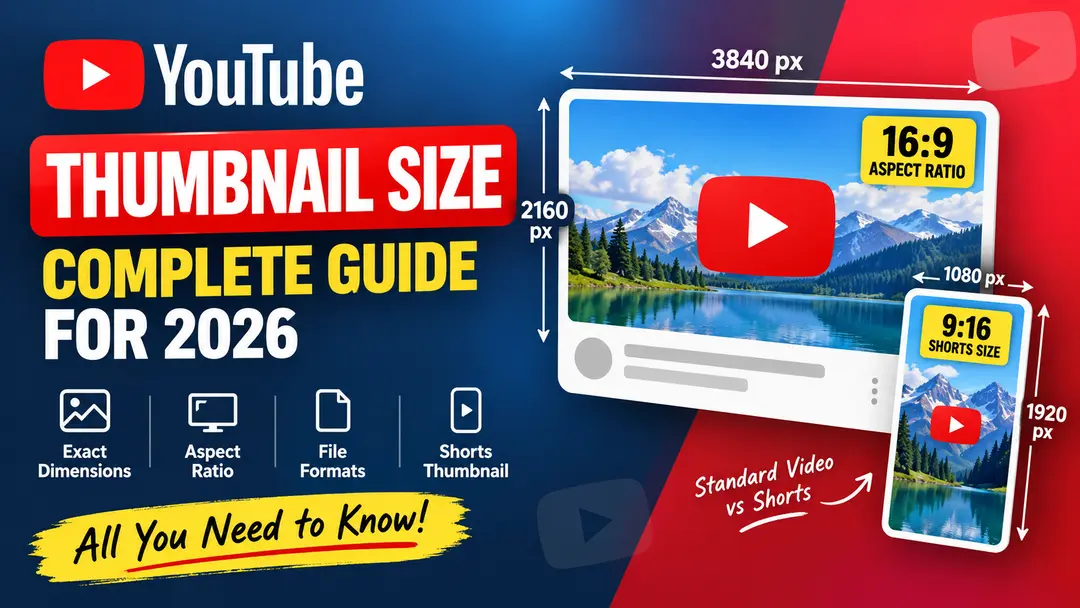
Choosing the right YouTube thumbnail size is important when you want your videos to look clear and professional across different screens. A properly sized thumbnail also helps you avoid unnecessary cropping, stretching, or quality loss.
In this guide, we cover the recommended YouTube thumbnail dimensions, aspect ratio, resolution, file formats, Shorts thumbnail size, and practical sizes you can use when designing thumbnails in 2026.
What Is the Recommended YouTube Thumbnail Size?
For standard YouTube videos, YouTube currently recommends a custom thumbnail with a resolution of 3840 × 2160 pixels. The recommended aspect ratio is 16:9, which is the standard widescreen format used by most YouTube videos.
YouTube also specifies a minimum width of 640 pixels for custom thumbnails. Using a larger source image gives you more flexibility when creating a sharp thumbnail that can be displayed across different devices.
| Specification | Recommended / Required |
|---|---|
| Recommended resolution | 3840 × 2160 px |
| Aspect ratio | 16:9 |
| Minimum width | 640 px |
| Supported formats | JPG, PNG |
Is 1280 × 720 Still a Good YouTube Thumbnail Size?
Yes. 1280 × 720 pixels is still a practical 16:9 working size for many thumbnail designs, especially when you are creating lightweight graphics for fast editing and everyday publishing.
However, it is useful to distinguish between a practical design size and YouTube's current recommended custom-thumbnail resolution. If you are starting a new design and your software or workflow can comfortably handle a larger image, the current recommendation of 3840 × 2160 pixels gives you more source resolution.
16:9 and easy to work with in most design tools.
Higher-resolution source for custom video thumbnails.
YouTube Thumbnail Aspect Ratio
The standard YouTube video thumbnail aspect ratio is 16:9. This ratio works naturally with the widescreen shape used by standard YouTube video players.
Keeping the 16:9 ratio helps your thumbnail maintain its intended composition instead of being unnecessarily stretched or cropped.
Common 16:9 dimensions include 1280 × 720, 1920 × 1080, and 3840 × 2160 pixels.
What Resolution Should a YouTube Thumbnail Have?
Resolution determines how much image detail is available in your thumbnail. A larger source image can be useful when you need to maintain clarity while editing, cropping, or placing text and graphics.
For standard custom video thumbnails, YouTube currently recommends 3840 × 2160 pixels. The image should maintain the 16:9 aspect ratio.
| Size | Aspect Ratio | Use |
|---|---|---|
| 1280 × 720 | 16:9 | Practical thumbnail design |
| 1920 × 1080 | 16:9 | Full HD workflow |
| 3840 × 2160 | 16:9 | Current YouTube recommendation |
What Is the YouTube Shorts Thumbnail Size?
YouTube Shorts use a vertical format. For Shorts, the recommended thumbnail dimensions are 2160 × 3840 pixels, which corresponds to a 9:16 aspect ratio.
Vertical 9:16 format
When designing a Shorts thumbnail, keep important text and visual elements away from areas that may be covered by interface elements on the screen.
YouTube Thumbnail File Size and Format
YouTube supports common image formats for custom thumbnails, including JPG and PNG. The format you choose should match the type of image you are creating.
Useful for photographic thumbnails and images where keeping the file size relatively small matters.
Useful for graphics, text-heavy designs, logos, and images where lossless quality is preferred.
What Is the Maximum YouTube Thumbnail File Size?
The maximum upload file size can depend on the current YouTube upload requirements and account features. Before uploading a thumbnail, it is a good idea to keep the image optimized so it remains sharp without carrying unnecessary file data.
If your image is much larger than necessary, export it with sensible compression while keeping text and important details clear.
Why Is 16:9 Important for YouTube Thumbnails?
The 16:9 ratio matches the shape of standard YouTube video content. Designing in the same ratio makes it easier to control your composition and keep important elements positioned correctly.
- Keeps standard video thumbnails in a widescreen format.
- Helps avoid unnecessary stretching.
- Makes thumbnail templates easier to reuse.
- Provides a familiar layout for desktop and mobile viewing.
YouTube Thumbnail Size for Mobile and Desktop
Your thumbnail may be viewed on phones, tablets, laptops, desktops, TVs, and other screens. That is why the source image should contain enough detail and readable visual elements.
| Device | What to Consider |
|---|---|
| Mobile | Large readable text and clear subject |
| Tablet | Balanced composition and contrast |
| Desktop | Sharp details and clean layout |
| TV | Strong visual hierarchy and legibility |
YouTube Thumbnail Size Cheat Sheet
| Thumbnail Type | Recommended Size | Aspect Ratio |
|---|---|---|
| Standard YouTube Video | 3840 × 2160 px | 16:9 |
| Practical 16:9 Design | 1280 × 720 px | 16:9 |
| Full HD Design | 1920 × 1080 px | 16:9 |
| YouTube Shorts | 2160 × 3840 px | 9:16 |
How to Make a YouTube Thumbnail the Right Size
You can create a correctly sized thumbnail in almost any modern image editor. The basic workflow is simple.
Choose Your Canvas Size
For a standard video, start with 3840 × 2160 pixels if your workflow supports the recommended resolution.
Keep the 16:9 Ratio
Make sure the canvas remains 16:9 so your composition fits the standard video format.
Add Your Main Visual
Use one clear subject and make the most important visual element easy to understand at a small size.
Keep Text Readable
Avoid very small text. Your thumbnail should remain understandable when displayed at a small size.
Export as JPG or PNG
Choose a suitable image format and optimize the file before uploading it to YouTube.
Common YouTube Thumbnail Size Mistakes
A thumbnail can look fine in an image editor but still become difficult to use if the canvas or design is not prepared correctly. Avoid these common problems.
- Using the wrong aspect ratio: Designing a standard video thumbnail in a non-16:9 canvas can make the composition harder to manage.
- Using very small source images: Low-resolution images can become soft when enlarged.
- Adding too much text: Small text becomes difficult to read, especially on mobile.
- Ignoring mobile viewing: A design should still communicate its main idea when viewed at a small size.
- Over-compressing the image: Excessive compression can make text, edges, and fine details look blurry.
How to Download a YouTube Thumbnail?
If you need to download the thumbnail associated with a public YouTube video, you can use YTThumbnailHD. Paste the video URL into the tool and view the available thumbnail images.
Download YouTube ThumbnailFrequently Asked Questions
YouTube currently recommends 3840 × 2160 pixels for custom video thumbnails, with a 16:9 aspect ratio.
Yes. 1280 × 720 is a practical 16:9 working size. However, YouTube's current recommended custom-thumbnail resolution is 3840 × 2160 pixels.
The recommended Shorts thumbnail dimensions are 2160 × 3840 pixels, using a vertical 9:16 aspect ratio.
Standard YouTube video thumbnails use a 16:9 aspect ratio. Shorts use a vertical 9:16 format.
JPG and PNG are common supported formats for custom YouTube thumbnails.