What Is a YouTube Thumbnail? A Beginner's Complete Guide
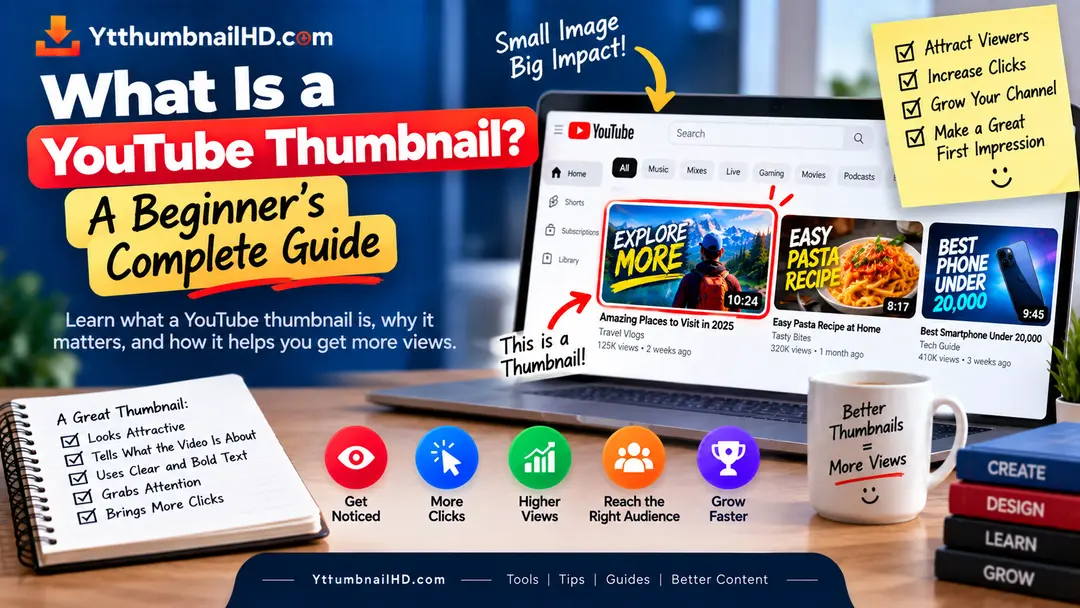
If you have watched YouTube for even a few minutes, you have already seen hundreds of thumbnails. They are the images that appear alongside videos and give you a quick visual idea of what a video is about.
But a YouTube thumbnail is more than just a picture taken from a video. Creators can use a custom thumbnail to choose the image and visual message that represents their video before someone decides whether to watch it.
If you are new to YouTube, understanding what a thumbnail actually does can make the whole video-publishing process easier.
This guide explains YouTube thumbnails from the beginning, without assuming that you already know anything about graphic design or YouTube Studio.
So, What Is a YouTube Thumbnail?
A YouTube thumbnail is the preview image associated with a video. It is one of the main visual elements viewers see while browsing YouTube before opening the video.
YouTube can provide automatically generated thumbnail options, while eligible creators can also upload a custom thumbnail for their videos.
What Does a YouTube Thumbnail Do?
The simplest way to understand a thumbnail is to think of it as the visual introduction to your video.
Before a viewer watches the video, they may see its thumbnail and title together. These two elements give the viewer an initial idea of the topic and help them decide whether the video is relevant or interesting.
YouTube itself describes thumbnails and titles as information viewers usually see first when deciding whether to watch a video.
A thumbnail therefore does not need to explain the entire video. Its job is to provide a clear visual starting point.
Where Do YouTube Thumbnails Appear?
You can encounter a video's thumbnail in several parts of the YouTube experience.
Thumbnails appear alongside videos recommended to viewers on the YouTube homepage.
When someone searches for a topic, thumbnails help them visually compare the videos shown in the results.
Thumbnails can appear beside or around other videos that a viewer is watching.
A channel's videos are presented with thumbnails, making the visual style of the channel noticeable.
The exact appearance can change depending on the device, YouTube surface, and viewer experience. YouTube also notes that thumbnails can appear differently across devices.
Custom vs Automatic Thumbnails
You do not always have to create a thumbnail completely from scratch.
YouTube can generate suggested thumbnail options from your video. Depending on your account and video type, you can also upload your own custom thumbnail.
YouTube selects an option
YouTube provides generated thumbnail choices based on frames or content from your video.
You choose the visual
You create or select an image that is specifically designed to represent your video.
For creators who care about how their videos are presented, custom thumbnails provide much more control over the visual message.
What Is Usually Inside a Thumbnail?
There is no fixed template that every YouTube thumbnail has to follow. Different channels use completely different visual styles.
However, many thumbnails contain some combination of the following elements:
- A main subject or image.
- Short supporting text.
- A background that separates the main subject.
- Colors that help create visual hierarchy.
- Branding elements such as a logo or recurring style.
You do not need to use all of these elements. In fact, a thumbnail can work perfectly well with only a strong image and a simple composition.
YouTube recommends avoiding overly complex designs and making text easy to read when text is used.
Thumbnail and Title: What's the Difference?
Beginners sometimes think that the thumbnail and title are two separate pieces of information. In practice, they work together.
Visual message
Helps communicate the video's idea through an image, composition, color, and optional text.
Written message
Explains the topic or promise of the video using words.
Imagine a tutorial about repairing a broken phone screen. The thumbnail might show the damaged screen and the finished result, while the title explains exactly what the tutorial teaches.
When the two elements complement each other, viewers can understand the video more quickly.
Why Do Creators Use Custom Thumbnails?
A custom thumbnail gives a creator control over how a video is visually presented.
Instead of relying on whichever frame YouTube happens to select, the creator can choose an image that better communicates the video's subject.
This can be especially useful when the important part of the video is not visually obvious from a single frame.
YouTube's own guidance notes that 90% of its best-performing videos have custom thumbnails. That does not mean a custom thumbnail guarantees more views, but it shows how commonly creators use them when packaging their videos.
What Makes a Thumbnail Easy to Understand?
You do not need advanced graphic design skills to understand the basic principles.
Start with clarity.
A viewer should be able to identify the main subject without spending several seconds studying the image.
A few useful questions to ask are:
- What is the main subject?
- Is the important part easy to see?
- If there is text, can it be read quickly?
- Does the thumbnail match the actual video?
- Does the design feel unnecessarily crowded?
YouTube recommends keeping thumbnail design simple enough to avoid overwhelming the viewer and making important text readable when text is included.
What Tools Can Beginners Use?
You do not need expensive professional software to make a YouTube thumbnail.
Beginners can use simple browser-based design tools, photo-editing applications, or more advanced desktop software depending on their experience.
Use a simple drag-and-drop design tool with ready-made layouts and text controls.
Use an editor that gives you more control over layers, images, typography, and effects.
Professional image-editing software can provide detailed control over composition, masking, color, and retouching.
The software matters less than the decisions you make with it. A simple, clear thumbnail can be more useful than a complicated design created with expensive software.
Common YouTube Thumbnail Mistakes for Beginners
When someone creates their first few thumbnails, it is easy to focus on making the image look impressive rather than making it understandable.
- Trying to fit the entire video into one image.
- Using too much text.
- Choosing a busy background.
- Making every element equally large.
- Using effects simply because they are available.
- Repeating the title word for word on the thumbnail.
- Making a promise that the video does not actually deliver.
A useful beginner rule is to remove something whenever it makes the main idea less clear.
A Simple Beginner Workflow
If you have never designed a thumbnail before, do not start by opening a blank canvas and randomly adding elements.
Start with the video itself.
Understand the video
Identify the main topic and the most interesting part of the video.
Choose the main visual
Pick the person, object, result, screenshot, or scene that should receive the most attention.
Add supporting elements
Add short text or other visual details only if they improve the message.
Simplify
Remove anything that makes the thumbnail harder to understand.
Check the final image
Look at it at a smaller size and make sure the main idea remains obvious.
What About YouTube Thumbnail Size?
Thumbnail dimensions are important, but they are only one part of the design process.
YouTube currently recommends that custom video thumbnails use a 16:9 aspect ratio and recommends a resolution of 3840 × 2160 pixels for videos. For Shorts, YouTube recommends 9:16 and 2160 × 3840 pixels.
We have covered the full size, dimensions, aspect ratio, resolution, and format requirements separately in our detailed YouTube thumbnail size guide.
Need a Thumbnail From an Existing YouTube Video?
If you are looking for the thumbnail of an existing YouTube video rather than creating a new one, you can use YTThumbnailHD to find and download the highest available thumbnail quality supported by that video.
Download YouTube ThumbnailFrequently Asked Questions
A YouTube thumbnail is the preview image associated with a video. It gives viewers a quick visual idea about the video before they decide whether to watch it.
Eligible creators can upload custom thumbnails for their videos. YouTube also provides automatically generated thumbnail options. Account verification may be required for custom thumbnails.
No. A thumbnail is an image that represents the video. The video is the actual moving content that viewers watch after opening it.
No. YouTube can generate thumbnail options automatically. However, custom thumbnails give eligible creators more control over how their videos are visually presented.
No. A custom thumbnail gives you more control over the presentation of your video, but it cannot guarantee a specific number of views or clicks. Performance also depends on the video, audience, topic, title, distribution, and viewer behavior.
Start with clarity. Choose one main subject, make it easy to see, use readable text only when necessary, and make sure the thumbnail accurately represents the video.